
AUTO ENGINE
Let the routine work wait for itself
Watch folders can use Safe Copy first, Process new files, or Index Only intake modes. Each folder routes into its own Project Destination and approved workflow.
The complete local-first workflow
SEE connects verified ingest, the archive, footage intelligence, camera-aware preparation, editorial proposals, human approval, and DaVinci Resolve execution without losing the job context between stages.
01 · ONE CONTINUOUS JOB
Each stage preserves the context needed by the next one. The operator can see what is ready, what needs review, and what remains gated.
Choose the Source Folder, Project Destination, intake intent, Folder Structure, camera treatment, and supported output controls in Mission Control.
Safe Copy checksum-verifies the protected copy and reports a clear safe-to-eject state before heavier processing continues.
SEE applies the named Folder Structure selected for the job or watch folder and merges into existing template folders without creating duplicate structure.
Technical metadata, local transcription, supported visual enrichment, music/beat analysis, sound-effect analysis, photo pairing, and timelapse detection feed a searchable library.
Camera profiles and selected treatment guide RAW decode, edit-ready preparation, scene matching, and film-finish controls.
Daily and master Broll, Soundbite, and Photo Selects plus FCPXML recipes feed proposed work into the Review Queue.
Approval creates the next Creative Build job. The operator still reviews it and deliberately runs the supported Resolve build.
02 · THE SYSTEMS
The product uses explicit states and receipts so a working editor can understand the job without learning internal implementation language.
AUTO ENGINE
Watch folders can use Safe Copy first, Process new files, or Index Only intake modes. Each folder routes into its own Project Destination and approved workflow.
MEDIA INDEX
Natural-language search and local transcription make the indexed library useful beyond filenames while preserving source-path context.
COLOR ENGINE
Camera-aware treatment, RAW decode, scene matching, saved looks, and film-finish controls prepare media for Resolve work.
CREATIVE BUILD
Briefs, treatments, storyboard preview, supported audio placement, and timeline-format controls prepare a deliberate Resolve build.
SOL
Sol can operate archive, search, color, build, and deliverable workflows, grounded in the built-in help and protected by confirmation gates.
TASTE MODEL
SEE uses final cuts and approvals to bias future selects and builds. Proposed organization improvements still require approval in Settings.
03 · REAL INTERFACE
The screen brings source, destination, treatment, verification, queue state, and the next required action into one operational view.
View all six product screens →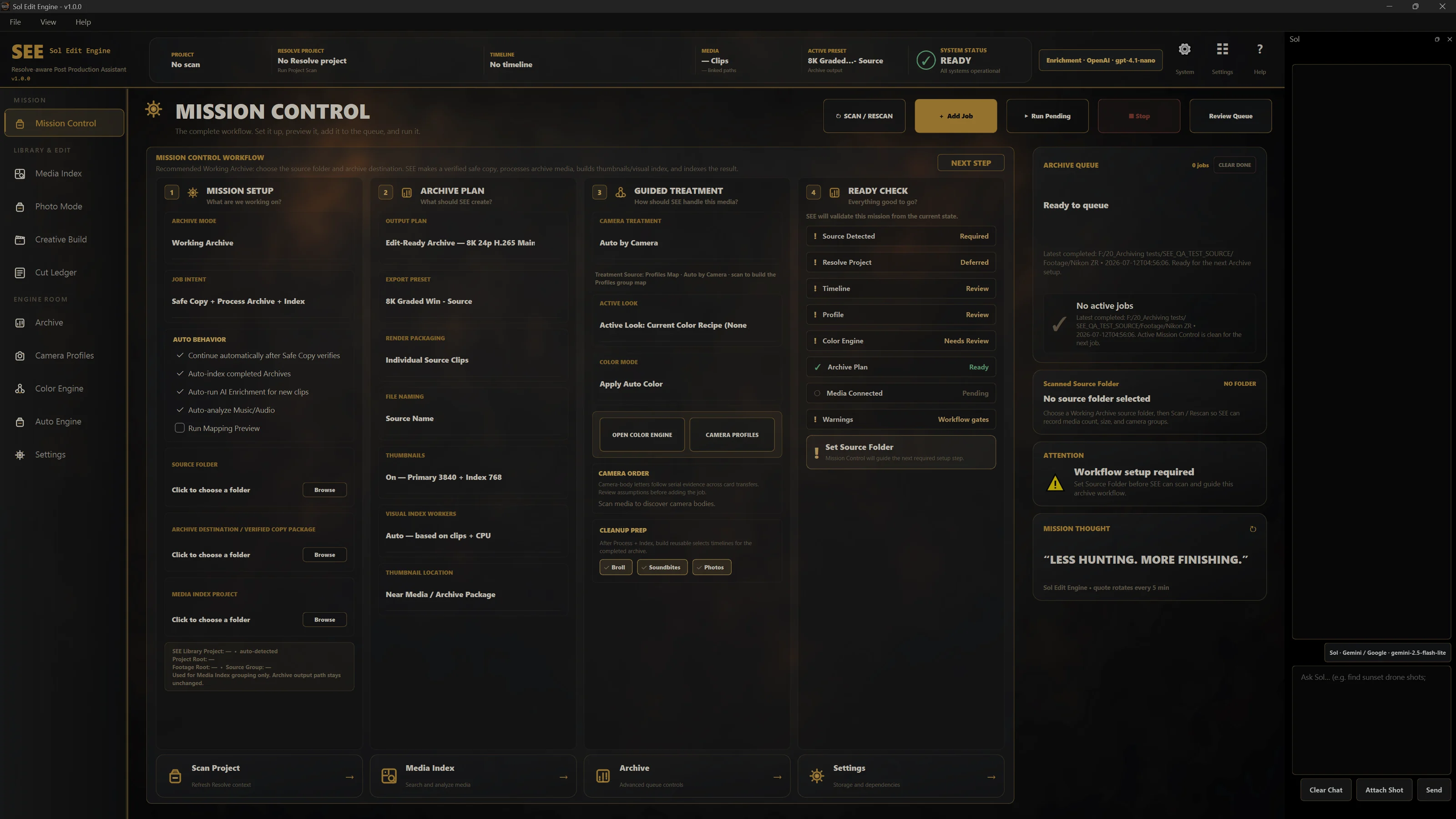
MODEL CONTEXT PROTOCOL
SEE’s local MCP connector lets an assistant inspect project and queue status, open existing projects, discover and call existing Sol tools, and track jobs. The documented integration supports Codex.
Confirmation-gated actions still require approval, and license checks still apply.
Currently available as a developer integration. Contact us to confirm access, supported clients, and compatibility with your setup.
Ask about MCP integration →NEXT STEP
Ask about early access or book a walkthrough of the real product.